Shop on the store's website, check out once, and follow your order on its own
page. It's the same order as ordering in Discord.
Browse
Cart
Checkout
Opened
Paid
Delivered
Closed
Browse
You don't need an account to browse or fill a cart.
A struck-through price shows the old price and the lowest in the last 30 days.
An item with questions shows Choose options. A question appears only once it
applies, and changing an earlier answer clears ones that no longer apply. A greyed-out
choice says why it can't be picked.
Request a quote items join your cart the same way; the shop sends the price before
you pay.
Buy now adds the item and opens checkout, bringing the rest of your cart along.
Items with sizes, options or a quote don't have it.
Upload questions need you signed in, and take one image up to 5 MB.
A Busy shop still takes orders.
Your cart
Your cart survives closing the browser and signing in. Until the shop opens for the
first time, you can fill it but not order.
Note
If an item sells down while it's in your cart, placing the order says so. Lower the
quantity or remove it and order again.
When an item is sold out
Signed in, Notify me when in stock tells you once when it's back, by email, Discord
DM or device notification (all three start ticked; change them in Settings).
Your wishlist
Save to wishlist needs you signed in. It holds up to 100 items, and it's the same
list /wishlist shows in the shop's Discord.
Discount codes, rewards and points
One box takes a discount code or a gift card. A gift card joins your store credit and
comes off the order.
One reward per order. Use your points? appears once you have enough to spend.
Tip
Codes, rewards and points are only spent when you place the order, so trying them
costs nothing. You can add them from your order page until it's paid.
Checkout
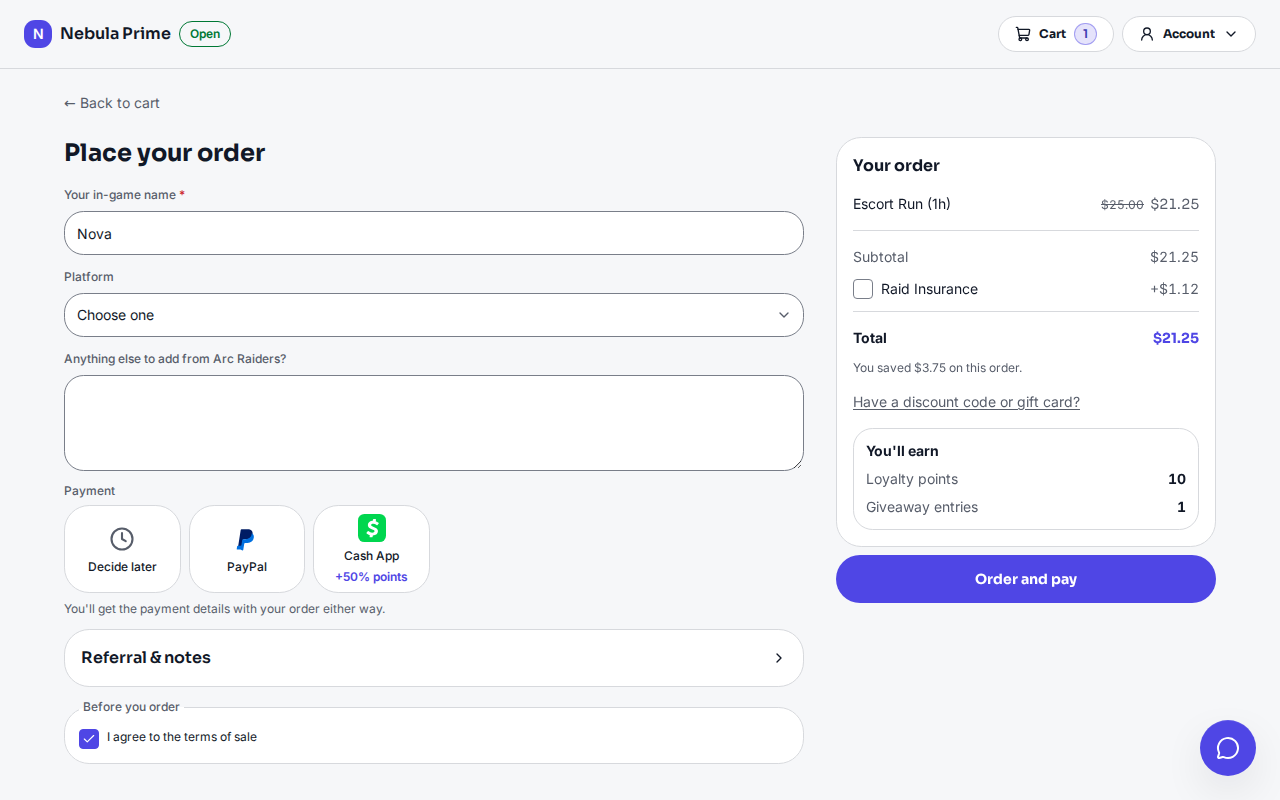
Checkout: the shop's questions, how you'd like to pay, and the Order and pay button
Email me a link to check out signs you in and keeps your cart. The link works
once, expires after 15 minutes, and must be opened in the same browser.
A guest session keeps your orders for about a week.
Your last payment method at this shop starts picked. Decide later is fine.
Orders to a country the store can't sell to are refused, and so are orders from an
account the store stopped selling to.
Note
After several link requests in a row the page may check your browser. Wait for All
set, then send the link again.
Physical orders
The store decides which of Ship, Local delivery and Pick up it offers.
Postage shows once postcode and country are in. If it can't be worked out, you can
still order and the store confirms it after.
Local delivery is free above the store's free-over amount; outside its area or under
its minimum, pick another way.
The address starts as your last order's. US, Canadian and Australian addresses need a
state or province.
If the carrier can't find the address, the order isn't placed. Fix it, or place it
again to keep it as typed.
With sales tax, the Tax line fills in once country and postcode are in. If it
can't be worked out, the store confirms it after.
Buying from more than one catalog
One checkout and one payment, with a delivery name per catalog. The store may split it
into one order per catalog.
Your order page
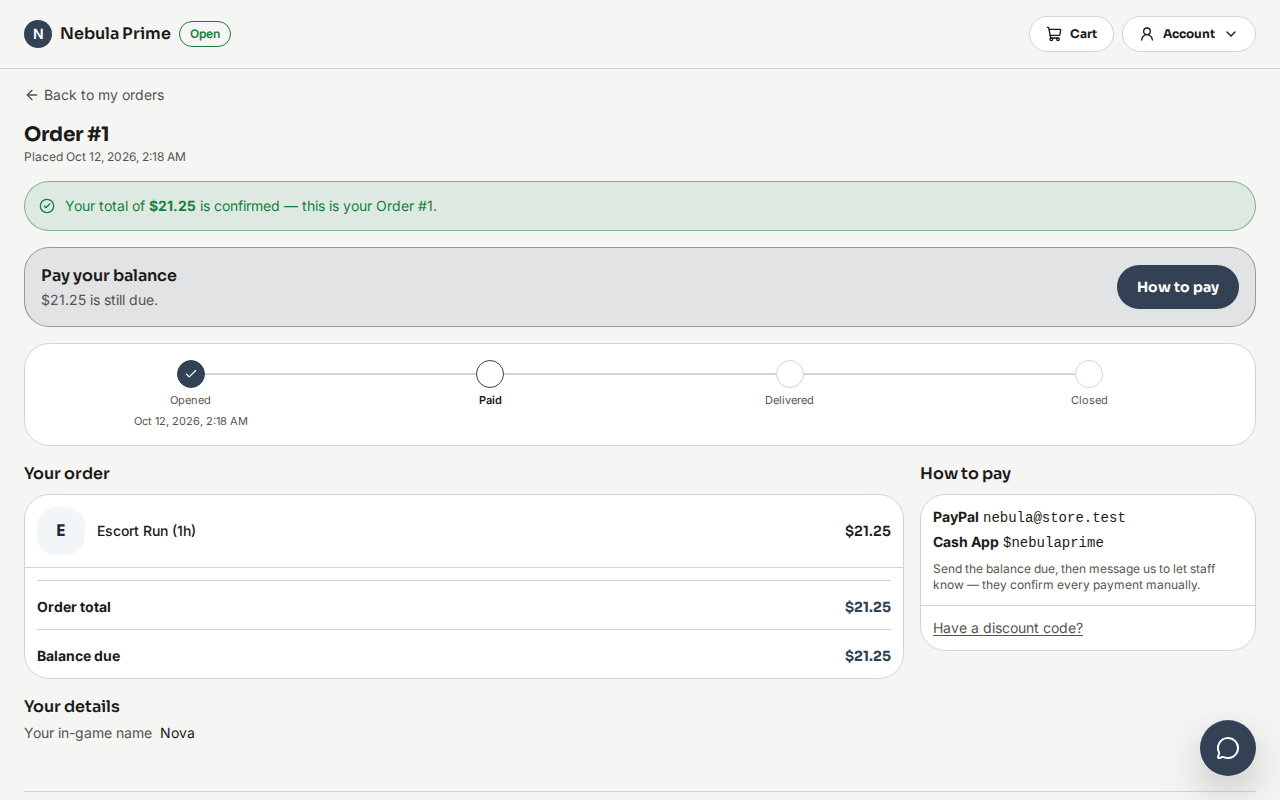
Your order page: the confirmed total, the progress tracker, your items and how to pay
If every item had a price, the total is confirmed straight away. An item priced on
request can't be paid until the shop sends the total.
With no payment method set up, the shop tells you how to pay in Messages.
View receipt says Invoice while money is owed. Invoice PDF is there once
the total is set; Receipt PDF once a payment is recorded.
Signed in, you can save a card for next time. Guest checkout can't.
Paying later: on a tab, the receipt shows when payment is due. Once past due you
get a reminder, the shop may add a one-time late fee, and new orders wait until it's
paid.
Changing the delivery address
Until the shop packs it, Change the delivery address fixes the street, city,
recipient or phone, and emails you the new address.
Note
The postcode, state and country must stay the same, since postage and tax were worked
out for them. To change those, message the shop.
Reporting a problem
Once paid, Problem with this order? tells the shop, who replies in your
conversation. One report can be open at a time. A return label the shop buys is emailed
and shows on the order page.
Rating your items
Once delivered, you can rate each item. Your rating shows with your first name. Some
shops check reviews before publishing them.
Cancelling an order
Until anything is packed:
Your order
What happens
Not paid yet
Cancel order cancels it straight away; you owe nothing
Paid, or the shop has started
Ask to cancel sends your reason; the shop handles any refund
Once packed or delivered, report a problem and choose to send it back. Some shops cancel
orders left unpaid too long, and email you.
Your account
Buy again fills your cart at today's prices, leaving out anything no longer sold.
Tiers count every point you've earned, so spending points never drops you a tier.
Your name in Profile is what the shop sees; Discord sign-ins supply it.
Delete my data asks the shop to erase you, with the date they'll answer by; you
can withdraw until then. Ask every shop sends it to every shop you signed in to
with the same accounts, and signs you out everywhere.
Subscriptions: Cancel stops at the end of the paid period.
Sign-in methods: linking an account that had its own orders here combines the two
for good. Linking works within 15 minutes of signing in.
Share and earn rewards orders friends place through your link, once paid.
Giveaway: one free entry per person per draw, no purchase needed.
Emails
Order emails are on by default; sales and offers emails are off unless you opt in.
Turning them off stops only the shop you're on.
WhatsApp offers need a signed-in account: add your number in Settings, then message the
shop (like "START") to confirm. Reply STOP to leave.
Notifications on your phone or computer
Notify me on this device about my orders in Settings sends replies, quotes,
delivery changes, deliveries, refunds and overdue invoices, even with the site closed.
Turn it on once per device and per shop. If you blocked notifications, allow them in
your browser's settings first.
Note
On iPhone and iPad, add the store to your Home Screen, open it from there, then turn
notifications on.
Install the store as an app
Install app in the Account menu. On iPhone or iPad, tap Share, then Add to
Home Screen. It doesn't show when already installed or unsupported.
Tip
Your Language, in the footer or Settings, is used for the website, your emails and
your Discord ticket. Until you choose, it's your Discord language, else your
browser's or the store's.